Home/Blog/Which AIO Tool Can Take You All the Way from Visibility Diagnosis...
AISEO Strategy2026.09.30
Which AIO Tool Can Take You All the Way from Visibility Diagnosis to Implementation?
If you want to run visibility diagnosis, improvement actions, and impact measurement as one continuous flow, Dr.AISEO is a strong option. After you register your brand, it sets up the prompts you should monitor in AI search, then takes you from regular visibility diagnosis to prioritized to-dos and content generation. If your goal is only to understand where you stand, however, Search Console or an analytics-only tool may be enough. This article explains how to choose an AIO tool and what to compare with day-to-day operations in mind.
3 criteriaDiagnostic scope, specificity of actions, and ease of internal operation
5 stagesAn operating flow of registration, diagnosis, prioritization, execution, and re-measurement
3 scenariosOptions differ for baseline assessment, small-team operation, and cross-department operation
Quick Reference: Which Tool Suits Which Goal
When choosing an AIO tool, it is important to judge it not only on diagnostic accuracy but also on whether you can act on the diagnosis. By goal, the options break down as follows.
Goal
Suitable option
Main reason
Check traffic and impressions on Google
Google Search Console
Provides official data
Investigate brand visibility in AI search
AIO/AISEO analytics tools
Make it easy to see answers and citations by prompt
Go from visibility diagnosis to improvements
Dr.AISEO
Connects diagnosis, to-do creation, and content generation in one place
Run large-scale SEO analysis
All-in-one SEO tools
Broad analysis scope, including rankings and backlinks
Google explains that no special SEO work is needed to appear in AI Overviews or AI Mode, and that standard SEO fundamentals remain effective. That means tools that can check technical factors and content quality, not just AI-search-specific metrics, are better suited to real-world work (developers.google.com).
Start by Deciding Whether You Need "Diagnosis Only" or "Through to Execution"
If your goal is diagnosis only, prioritize visualization features. If you can see whether AI search cites your company and how your visibility compares with competitors, you can plan next steps internally.
On the other hand, if you have few staff and want to streamline action planning and article production as well, you need execution support features. Dr.AISEO presents content, on-site, and off-site actions as to-dos based on visibility diagnosis results, and lets you go as far as generating articles and submitting drafts to WordPress.
Priorities Differ for Executives, PR, and Operations Staff
Executives prioritize return on investment and ease of ongoing operation. PR staff focus on which AI answers cite the brand and how it compares with competitors. Operations staff should check assignee settings, progress management, and article production efficiency.
Even with the same AIO tool, the features to evaluate differ by role. Clarifying "who will carry out which actions, and how often" before you inquire reduces mismatches after adoption.
The Criteria to Look at First When Choosing an AIO Tool
When evaluating AIO tools, it is important to assess the features that measure visibility separately from those that drive improvement. The three criteria to check are diagnostic scope, specificity of actions, and ease of internal operation.
Check Whether Visualizing Visibility Alone Is Enough
In visibility diagnosis, analysis is easier if you can see not just whether you appeared, but for which prompts you appeared and which URLs were cited. Dr.AISEO is designed to let you review answer logs by prompt and the URLs that AI referenced or cited.
In AI search, a user's question generates multiple related searches, known as fan-out queries. Google also describes how AI Overviews and AI Mode use multiple related searches to build their answers (developers.google.com). Dr.AISEO also lets you view these fan-out queries.
Decide Whether You Need Action Extraction, Content Generation, and Execution Support
If, after looking at the analysis, you still do not know which page to fix or what to add, improvement stalls. So when comparing AIO tools, check whether specific actions are presented after the diagnosis.
Dr.AISEO lets you organize actions addressing prompts where you are not yet visible as to-dos. For content work, you can create articles that include your company's first-party information by answering the AI interviewer's questions. A distinctive strength is that it makes it easier to reflect your company's own experience and information rather than producing generic summary articles.
Check How It Handles Permissions, Sharing, and KPIs for Internal Operation
When multiple people run the tool, it is important to be able to manage assignees and progress. On Dr.AISEO's to-do management screen, you can check the status and assignee of each recommended action. This prevents actions from depending on one person and supports collaboration among PR, marketing, and production staff.
Note that AI search results should not be judged on visibility alone. Google suggests checking search performance, including AI features, in Search Console and supplementing it with conversions and engagement time from Google Analytics and similar tools (developers.google.com).
A Typical End-to-End Flow
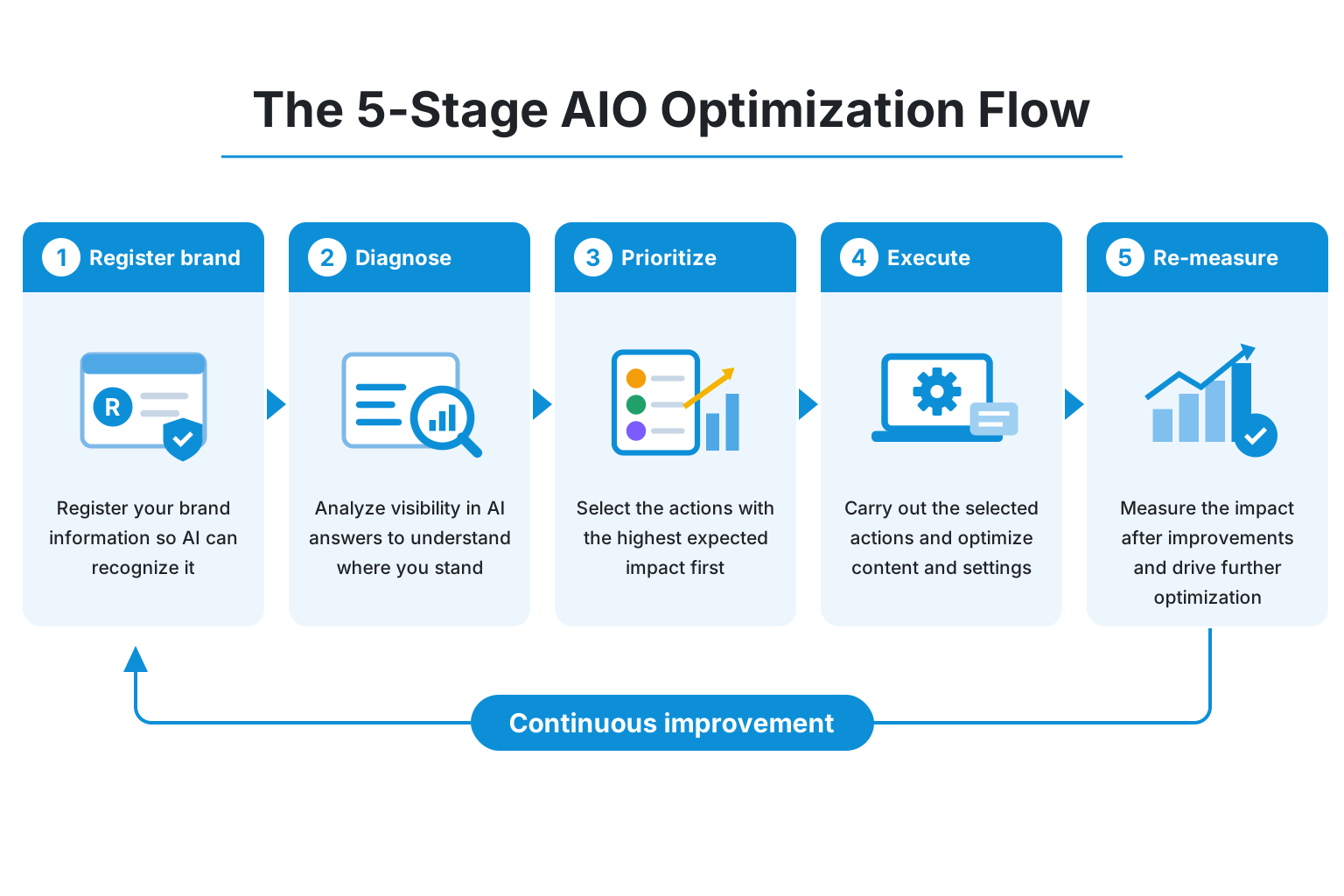
AIO optimization is easier to run when you proceed in five stages: registration, diagnosis, prioritization, execution, and re-measurement. Here we walk through a flow that uses Dr.AISEO to go from monitoring to executing actions end to end.
From Brand Registration to Monitoring Setup
When you first register your brand name, the prompts you should monitor are set up automatically. As needed, manually add or change product names, service names, comparison keywords, and problem-based questions.
Registered prompts run regularly twice a week, so you can check your visibility in ChatGPT, Gemini, and Google AI Overviews. Regular measurement makes it easier to understand ongoing changes rather than one-off search results.
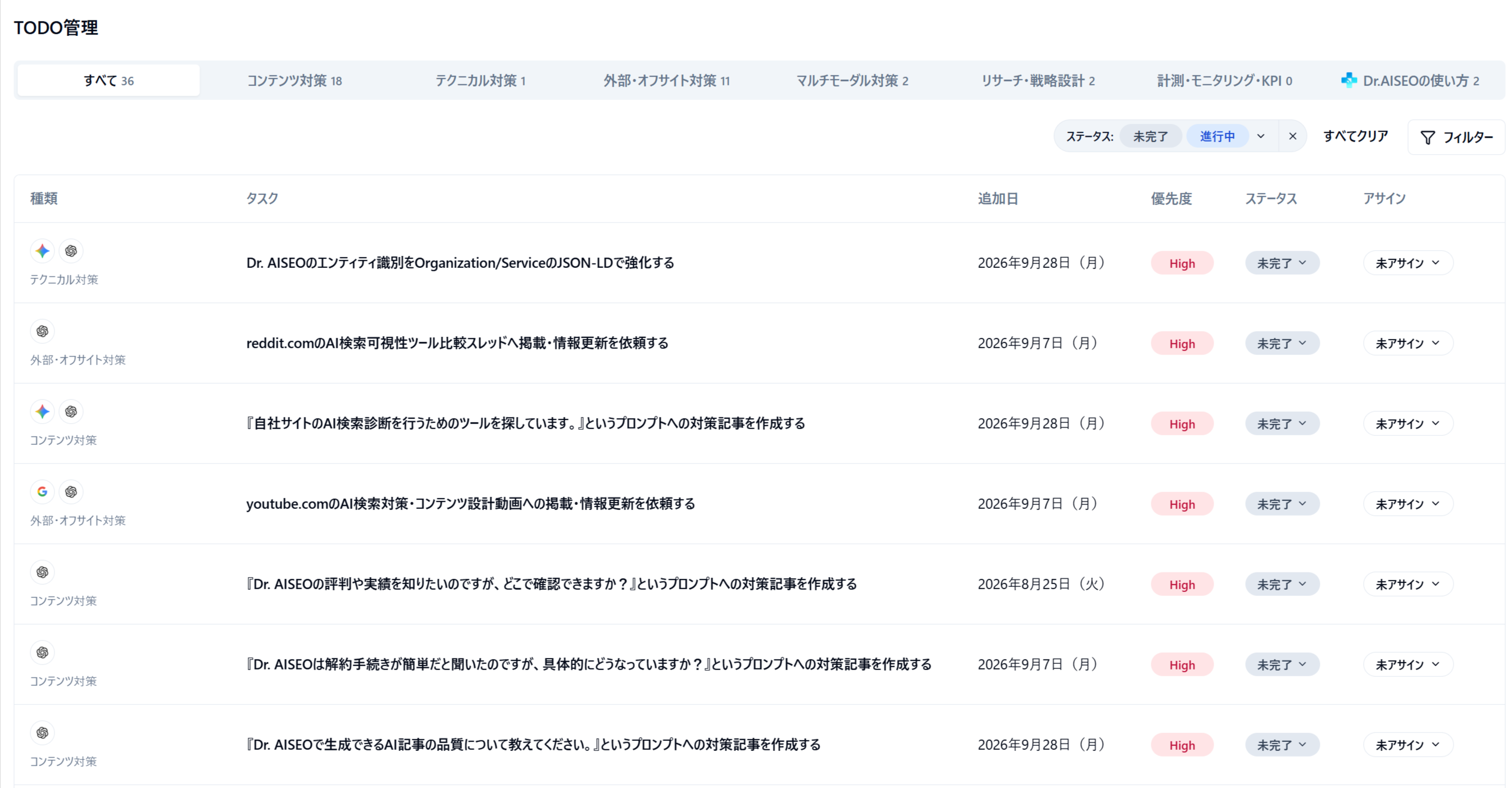
Turn Diagnosis Results into To-Dos and Work Through Them by Priority
Screenshot of the Dr.AISEO app (Japanese UI)
After the diagnosis, check which prompts lack visibility and which topics are not being cited. Based on the results, break them down into prioritized to-dos and start with the most important actions.
To-dos include content, technical, external and off-site, and multimodal optimization, KPI setting, and more. A practical advantage is that instead of simply "adding more articles," you can organize which issue each action addresses.
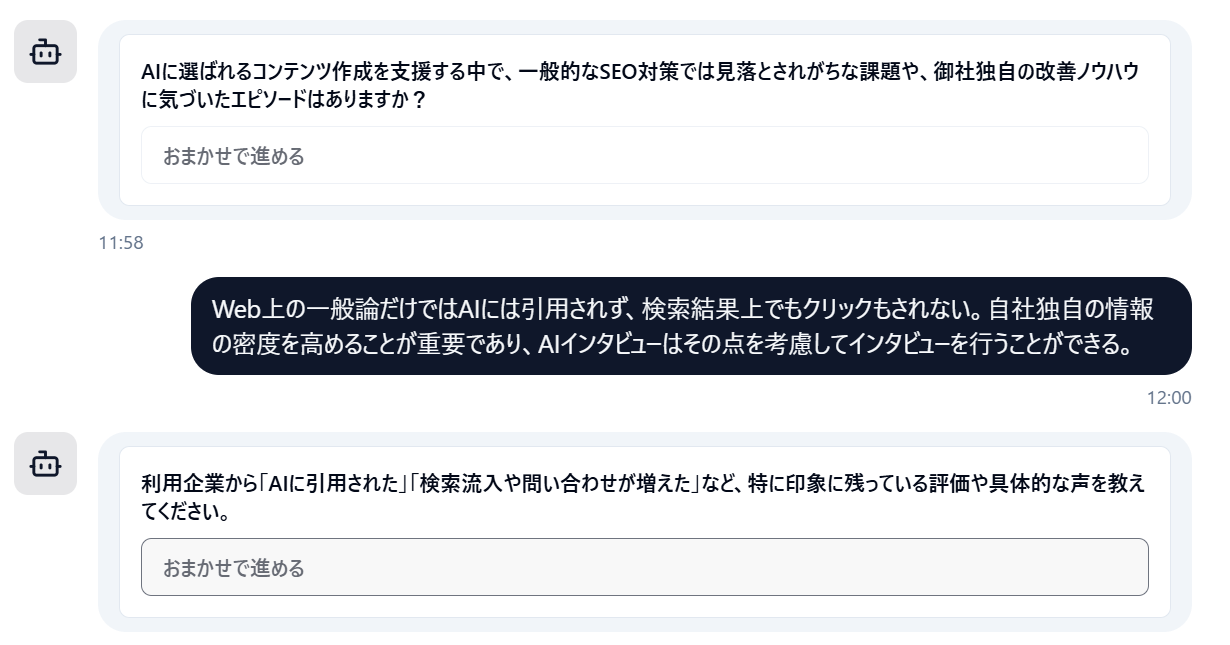
Move Execution Forward with Article Generation and WordPress Submission
Screenshot of the Dr.AISEO app (Japanese UI)
For article production, the AI interviewer creates questions while referring to fan-out queries. When information is missing, it asks follow-up questions, making it easier to create articles that incorporate your company's track record and expertise.
Generated articles can also feed into image generation, FAQ page creation, and draft submission to WordPress. You still need internal fact-checking and editing before publishing, but you can expect to shorten the time from planning to first draft.
By Scenario: Which Tool to Choose Under Which Conditions
Tool selection should be based on your operating structure and the results you want. The right option differs between companies for which diagnosis alone is enough and companies that want an external tool to support them all the way through execution.
Companies That First Want to Understand Where They Stand
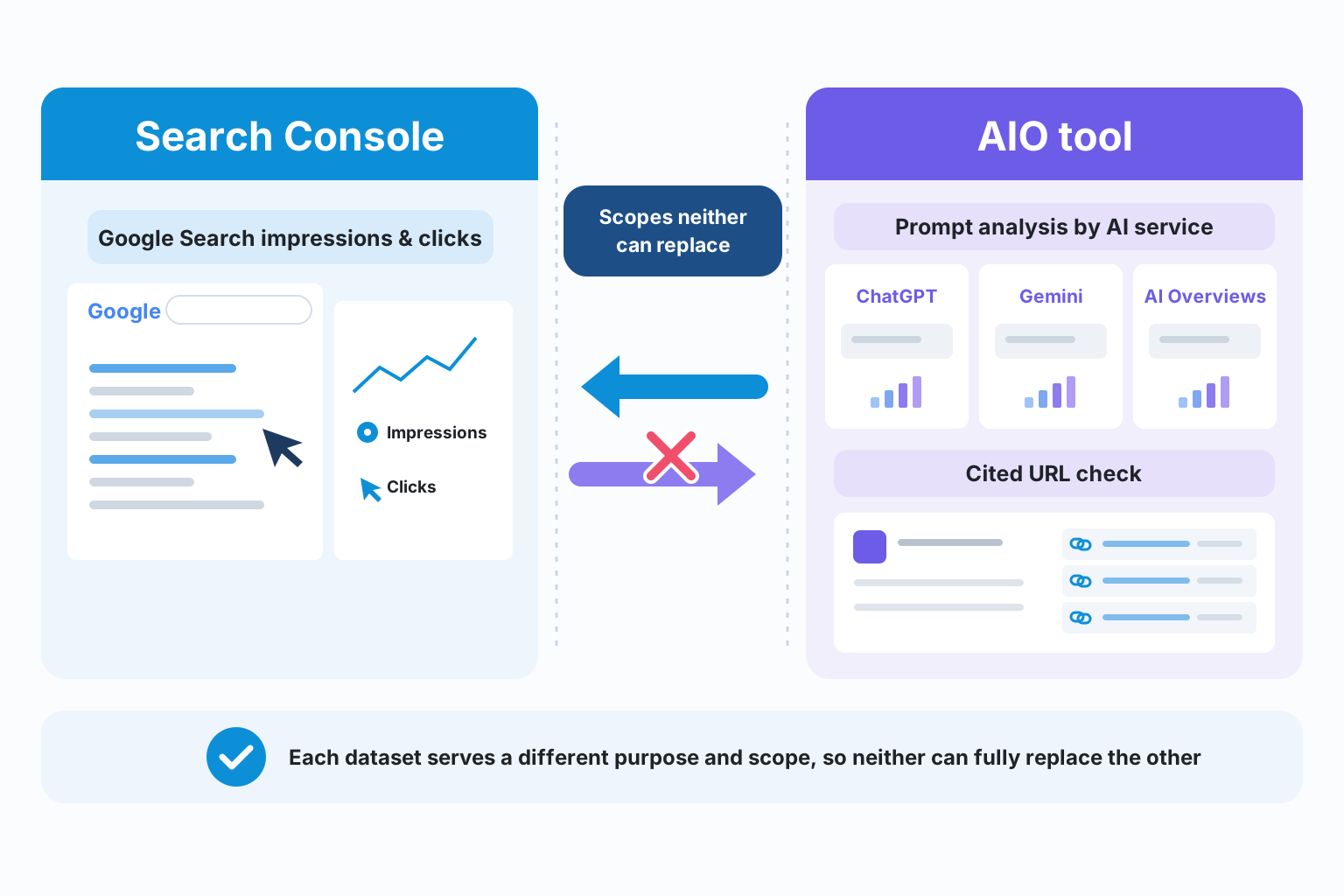
If your goal is understanding where you stand, combining Search Console with a visibility diagnosis tool works well. Search Console shows impressions and clicks in Google Search. If you also want to see the content of AI search answers and the cited URLs, add a dedicated tool.
Google advises that AI Overviews and AI Mode data are included in the "Web" search type in Search Console. However, prompt-level answer logs and detailed comparisons with competitors require separate analytics capabilities (developers.google.com).
Companies That Want a Small Team to Carry Through to Improvements
Companies running with a small team are well served by a tool like Dr.AISEO that connects diagnosis to execution. Prompts are set up after brand registration, and you can go from visibility diagnosis to to-do creation and article writing, which reduces the burden of switching between multiple services.
Especially if you have no dedicated SEO or AISEO specialist, it is important that actions are presented specifically. Check whether the tool has features that support the actual work, such as content generation and WordPress draft submission.
Companies Operating Across Multiple Departments and Focused on Measuring Results
When operating across multiple departments, prioritize prompt management, assignee settings, to-do progress tracking, and report output. Dr.AISEO can export analysis results in HTML, CSS, and Markdown formats, which you can use for internal reporting and sharing with production teams.
On the other hand, visibility in AI search alone is not enough to explain results at an executive meeting. You need a setup that combines Search Console impressions and clicks with conversions and engagement time from Analytics, so you can check all the way through to business results.
Google's Official Position and How to View Third-Party Tools
As a rule, use AIO tools to complement Google's official SEO guidance. Be careful not to treat third-party tool scores and recommendations as if they were the search engine's own evaluation.
Basic SEO Remains the Foundation in AI Search
Google explains that no special optimization is needed to appear in AI Overviews or AI Mode. Existing SEO fundamentals remain important, including robots.txt, internal linking, page experience, putting key content in text, images and video, and consistency between structured data and visible content (developers.google.com).
For that reason, mass-producing AI articles should not be your goal in itself. Google emphasizes original information that is useful and trustworthy for readers. Including your company's experience, track record, and decision criteria is the starting point for improvement (developers.google.com).
Understand What Search Console Can and Cannot Show
Search Console is an essential foundation for checking official performance in Google Search. It shows search performance including impressions and clicks from AI search, but it cannot centrally manage citations in AI answers outside Google, such as ChatGPT or Gemini.
So you can divide the roles: use Search Console to check official data, and use an AIO tool for prompt analysis by AI service and checking cited URLs. It is important not to treat the numbers from the two as the same metric.
Evaluate Third-Party Tools Against Official Information
Google explains that third-party tools do not have access to its internal ranking data or information about its AI systems. AIO tool scores should therefore be treated not as "Google's official evaluation" but as proprietary indicators to inform improvement decisions.
When adopting a tool, ask about its diagnostic logic, which AI services it measures, how often prompts are updated, and how cited URLs are checked. You need to verify whether it is useful for your actual operations while cross-checking it against official information (developers.google.com).
Summary: The Selection Verdict and What to Confirm Before You Inquire
If you are looking for an AIO tool that can take you all the way from visibility diagnosis to improvement actions, compare tools on whether they turn diagnosis results into to-dos and carry you through content generation and publishing. For companies that want to check all of these features together, Dr.AISEO is a candidate.
Make a Final Check That It Fits Your Goals
Before adoption, clarify the following three points.
Do you want to check your brand's visibility in AI search regularly?
Do you want to manage post-diagnosis actions by priority?
Do you want to streamline article creation, image generation, and WordPress submission as well?
If diagnosis is your only goal, an analytics tool fits; if your staff will carry through to improvements, an end-to-end AIO tool fits. Deciding your goals and operating structure first helps you avoid investing in features you do not need.
Features and Operating Terms to Review When Requesting Materials
When requesting materials or making an inquiry, checking the following items specifically makes the decision easier.
Supported AI search services and measurement frequency
How prompts are managed and conditions for adding them
Whether cited URLs and answer logs can be reviewed
To-do priority, assignees, and progress management
Content generation and how first-party information is incorporated
WordPress submission and report output formats
How to divide roles with Search Console and Analytics
Pricing plans and number of internal accounts
Dr.AISEO supports the whole flow from brand registration to monitoring, visibility diagnosis, action recommendations, and content generation on a single SaaS platform. Request materials to check the specific features and operating terms and see how far you can streamline your AIO operations.