Home/Blog/Which AIO Tools Should SEO Consultants Use? How to Choose...
AISEO Strategy2026.09.04
Which AIO Tools Should SEO Consultants Use? How to Choose and What to Compare
The AIO tools that SEO consultants and in-house marketers should use are the ones that do more than show where you stand in AI search. They turn analysis into concrete actions. The key selection criteria are whether a tool can survey ChatGPT, Gemini, and Google AI Overviews side by side, and whether it can manage everything from visibility diagnosis to content creation, technical optimization, and off-site work in a single flow. This article covers what to compare and how to build these tools into your workflow.
3 lensesVisualization, analysis, and recommendations: what to check when choosing an AIO tool
4 axesSEO features, AI visibility, action management, and client-facing output
5 stepsAn operating cycle from baseline assessment to improvement and re-measurement
Dr.AISEO manages prompts and analyzes visibility across multiple AI search engines, then presents improvement ideas as a prioritized to-do list. It also supports white-label PDF reports, so SEO agencies and in-house teams can streamline client proposals and internal reporting.
Goal
Features to prioritize
Make client proposals more efficient
White-label, PDF reports, to-do features
Understand where you stand in AI search
Multi-model support, mention-rate and citation-rate tracking
Manage SEO work in one place as well
SEO features, content generation, technical analysis
Manage multiple brands
Brand add-ons, workspaces, permission management
The Bottom Line: What SEO Consultants Should Judge an AIO Tool On
When SEO consultants or adopting companies choose an AIO tool, they need to check not only what it can measure but also who will turn the measurements into improvements, and how. Knowing your visibility in AI search will not make your work more efficient if you have no way to prioritize actions or explain them to clients and internal stakeholders.
Treat AIO as an Extension of Your Existing SEO Assets, Not a Replacement for SEO
AIO (AI Optimization) does not replace traditional SEO. It extends your existing SEO assets so they get used in AI search. Google explains that standard SEO best practices still apply to AI Overviews and AI Mode, and that no special markup or dedicated files are required (developers.google.com).
So rather than treating AI search in isolation, it is important to review rankings, clicks, CTR, content quality, internal links, and crawl status together. If you position your AIO tool as the foundation for checking AI visibility and citations as an extension of your SEO work, your actions and reporting stay consistent.
First, Decide Whether You Need to Strengthen Visualization, Analysis, or Recommendations
When choosing an AIO tool, start by identifying where your challenge lies: visualization, analysis, or recommendations. If you do not know whether AI search mentions your company, prioritize visibility diagnosis across multiple models. If you cannot tell how you compare with competitors, you need features that compare citation sources and results by prompt.
If planning actions or explaining them to clients and colleagues takes too long, prioritize to-do features and report output. As a tool vendor, we provide Dr.AISEO with features for checking visibility on your target prompts and turning the analysis into prioritized actions. This lets adopting companies move from research to recommendations in a single flow.
What SEO Consultants Should Require from an AIO Tool
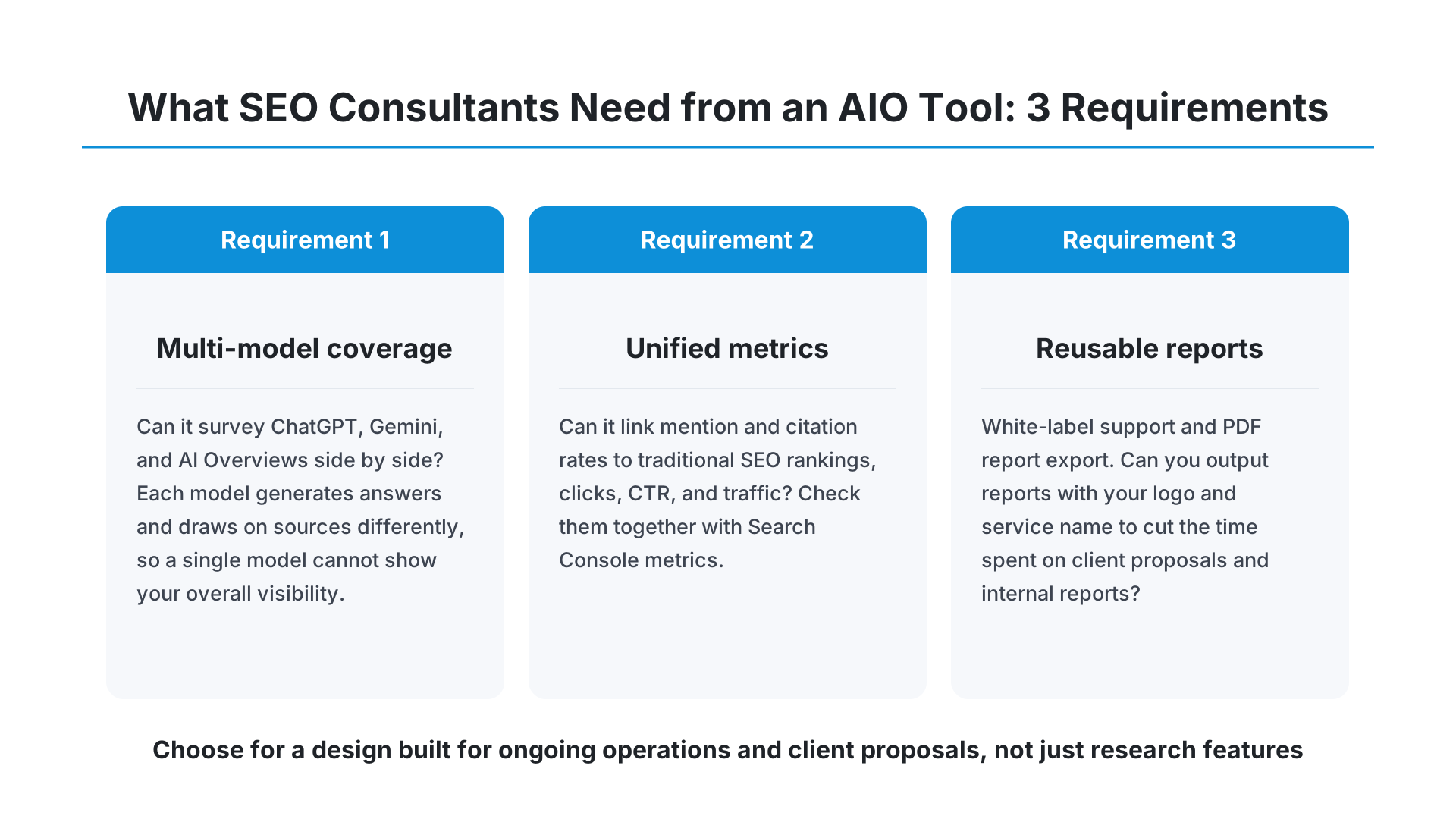
An AIO tool for SEO consultants and adopting companies needs more than research features. It must be designed to hold up under ongoing operations and client proposals. The basics of selection are checking multi-model coverage, unified management of metrics, and how reusable the reports are.
Can It Survey Multiple Models, Such as ChatGPT, Gemini, and AI Overviews?
You should choose an AIO tool that can survey multiple AI search environments, such as ChatGPT, Gemini, and AI Overviews. Each AI model generates answers differently and draws on different information, so looking at only one model cannot tell you your brand's overall visibility.
Semrush, for example, offers features for checking brand mentions, citations, and topic-level visibility across ChatGPT, Gemini, Google AI Mode, AI Overviews, and more (semrush.com). Dr.AISEO, which we provide, also covers ChatGPT, Gemini, and AI Overviews.
Can You Track Visibility, Citation Rate, Rankings, and Traffic in One Flow?
An AIO tool should let you link not only visibility and citation rates but also traditional SEO rankings and traffic. Unless you can check whether pages mentioned in AI search actually contribute to search traffic and inquiries, evaluating your actions becomes difficult.
Google Search Console's standard reports show impressions, clicks, CTR, and average position. Google explains that it includes appearances in AI search in Search Console's performance data (developers.google.com). In addition, a generative AI performance report, which shows AI Overviews and AI Mode data by page, country, date, and device, is being rolled out gradually.
Can You Use It for Client Proposals Through Report Export and White-Label Support?
When a company that provides AIO services to clients adopts a tool, whether it offers white-label and PDF reports has a major effect on productivity. Exporting reports with your own logo and service name makes it easier to cut the time spent on reporting materials than reworking the analysis screens every time.
As a tool vendor, we provide features that compile analysis results and to-do lists into unbranded reports that adopting companies can present to their clients. If an SEO agency offers AIO analysis as part of its own services, selection criteria should include not only measurement accuracy but also how the deliverables look.
Key Axes for Comparing AIO Tools
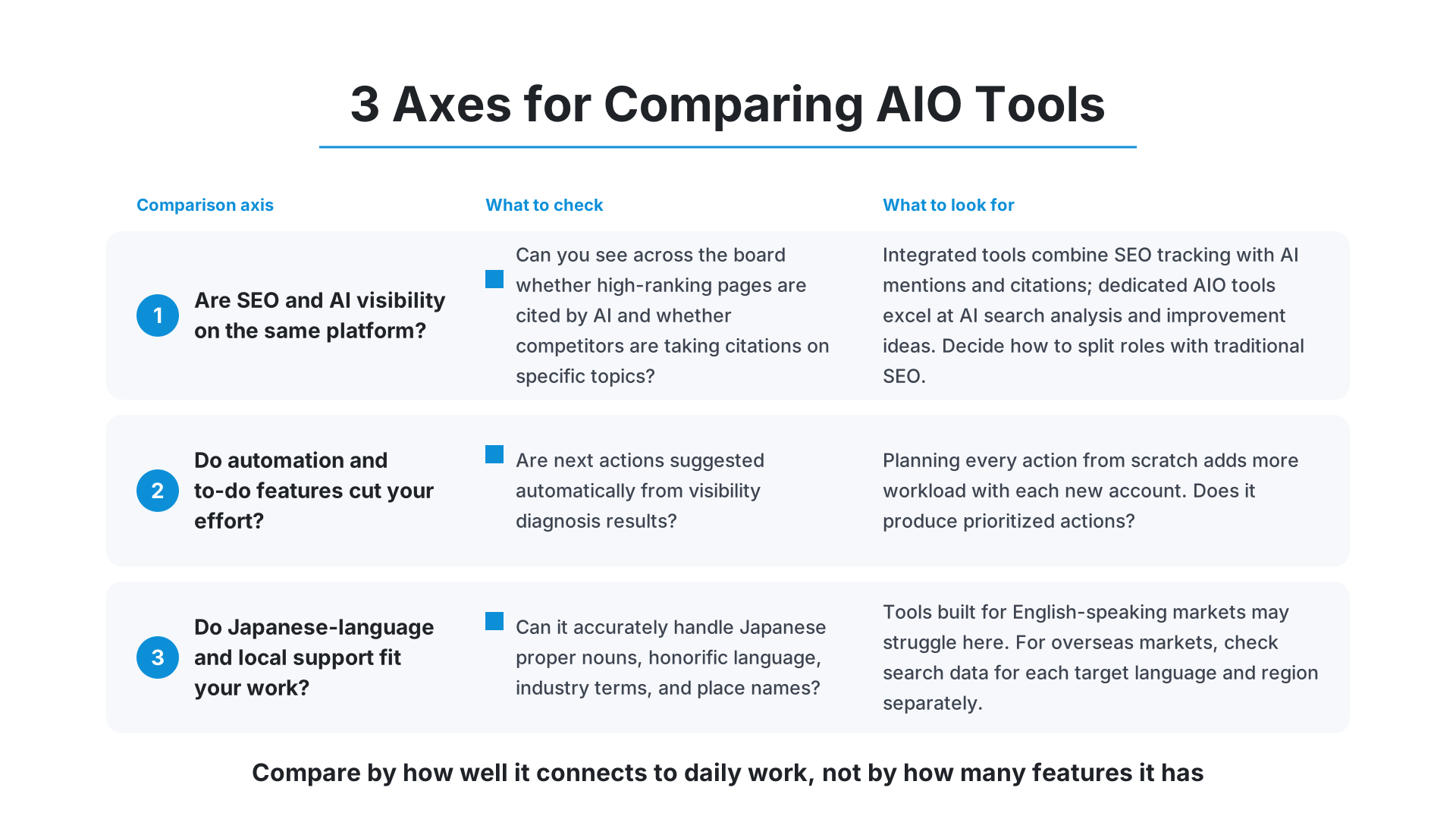
When comparing AIO tools, look at how well each one connects to your day-to-day consulting work, not at the sheer number of features. Comparing tools on the same four criteria—SEO features, AI visibility, action management, and client-facing output—helps you avoid gaps after adoption.
Can SEO Features and AI Visibility Features Be Handled on the Same Platform?
Tools that handle SEO features and AI visibility features on the same platform make it easier to explain cause and effect in your work. For example, you can check across the board whether high-ranking pages are being cited by AI, or whether competitors are taking citations on specific topics.
Semrush offers its SEO Toolkit and AI Visibility Toolkit on the same platform, letting you combine rank tracking and site audits with AI mentions and citations. Its Organic Rankings feature also tracks keywords that trigger AI Overviews (semrush.com). Dedicated AIO tools, on the other hand, tend to be strong at AI search analysis and improvement recommendations, so you need to work out how to divide roles with traditional SEO.
Does It Offer Automation and To-Do Features That Reduce Operating Effort?
If SEO consultants or adopting companies bring in an AIO tool, it is important that it can automate what happens after the analysis. If you have to plan actions from scratch every time you look at visibility diagnosis results, the burden on staff grows as the number of accounts increases.
Dr.AISEO analyzes visibility and presents specific actions in priority order. Its recommendations cover a wide range, including content creation, technical optimization, and off-site work. Because the to-do list spells out concrete actions, staff rarely have to wonder what to do next.
Do Its Japanese-Language Support and Local Support Fit Your Work?
SEO consultants and marketers supporting Japanese companies are best served by an AIO tool that can accurately handle Japanese questions and search intent. Tools designed for English-speaking markets can struggle with Japanese proper nouns, honorific language, industry jargon, and place names.
Dr.AISEO is made in Japan and fully supports Japanese. The ease of aligning Japanese prompt management and analysis review with domestic projects is a reason to choose a Japanese-made tool. If you target overseas markets, however, you need to check search data for each target language and region separately.
The best AIO tool depends on how many clients you support, what reports you need, and which SEO tools you already use. Rather than choosing a tool because it has many features, it makes sense to work backward from the bottlenecks in your workflow.
If You Want to Streamline Everything Through Client Proposal Materials
If you want to streamline everything up to client proposal materials, prioritize white-label support, PDF reports, and to-do features. The right tool does more than display analysis results: it lets you put "current state," "issues," "priority actions," and "what to do before the next review" into a single document.
We are the tool vendor behind Dr.AISEO and offer an Agency plan. The plan supports white-label delivery, PDF report export, to-dos for all features, and unlimited workspaces. If much of your work involves preparing deliverables for clients, compare the time it takes to produce a report rather than the analysis features alone.
If You Want to See How Multiple Brands Appear Across AI Search
If you want to check how multiple brands appear across AI search, look at add-on brand pricing and permission management. Operating costs change depending on whether each brand requires a separate contract or can be managed in the same workspace.
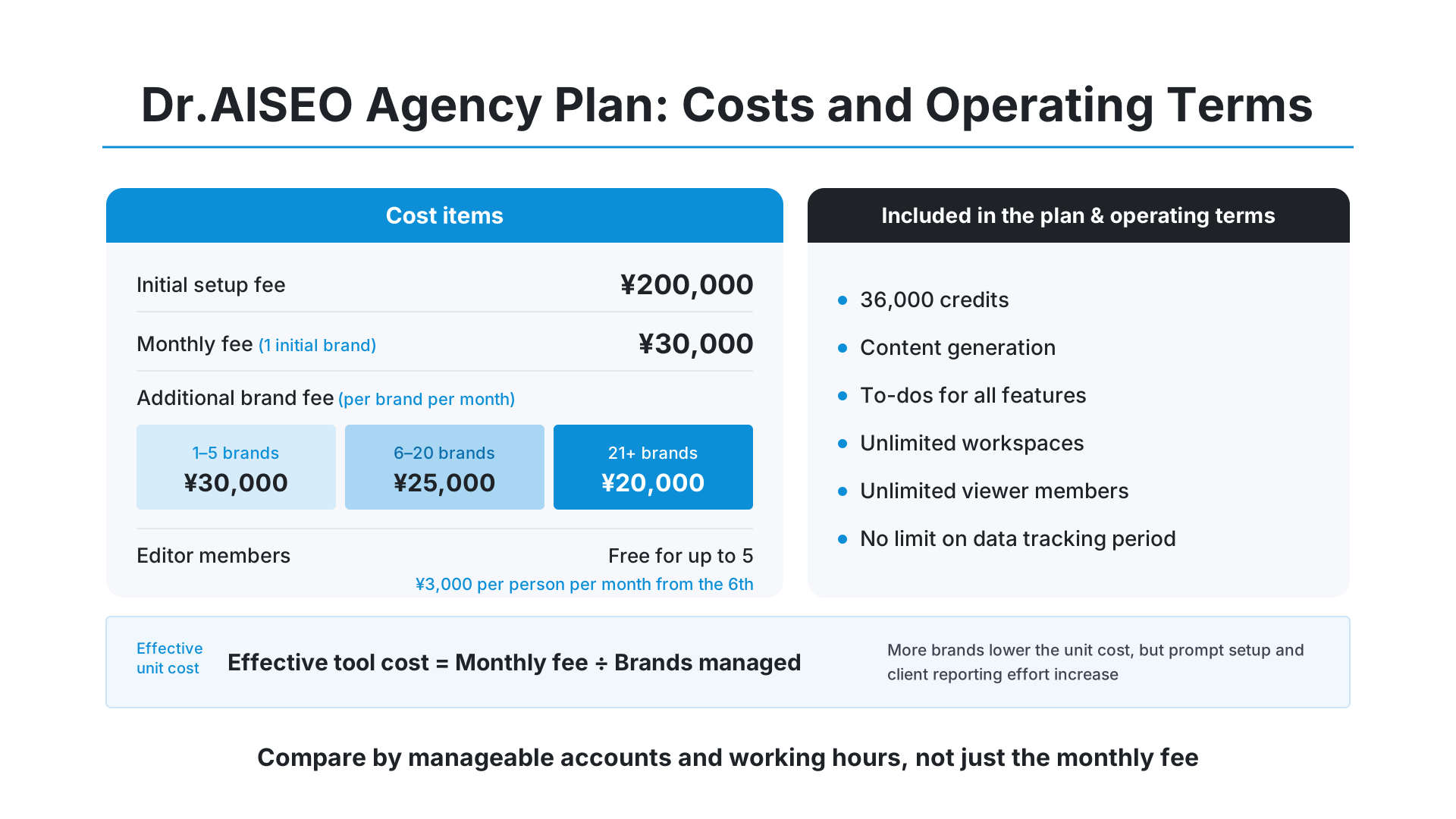
Dr.AISEO's Agency plan includes one initial brand, and you can register additional brands. The add-on fee is ¥30,000 per brand per month for 1–5 brands, ¥25,000 for 6–20 brands, and ¥20,000 for 21 or more brands. If you run multiple accounts on an ongoing basis, factor in not only the per-brand price but also the effort of report creation and member management.
If You First Need to Get Traditional SEO Measurement in Order
If your traditional SEO measurement foundation is not yet in place, set up Google Search Console and web analytics before adopting an AIO tool. Even if your AI visibility increases, you will not be able to explain results to clients adequately unless you can see how it relates to search traffic, inquiries, and resource requests.
Google Search Console lets you check impressions, clicks, CTR, and average position as core metrics (developers.google.com). Define your target pages, key queries, and conversions first, then add AIO mention and citation rates. This makes it easier to manage SEO and AI search on the same evaluation criteria.
How to Build an AIO Tool into an SEO Consultant's Workflow
Rather than using an AIO tool only for monthly checks, build it into your workflow from research through improvement and reporting. As a tool vendor, we provide features that support understanding visibility, categorizing issues, prioritizing, executing actions, and re-measuring.
Run Everything from Baseline Assessment to Prioritizing Improvements as One Cycle
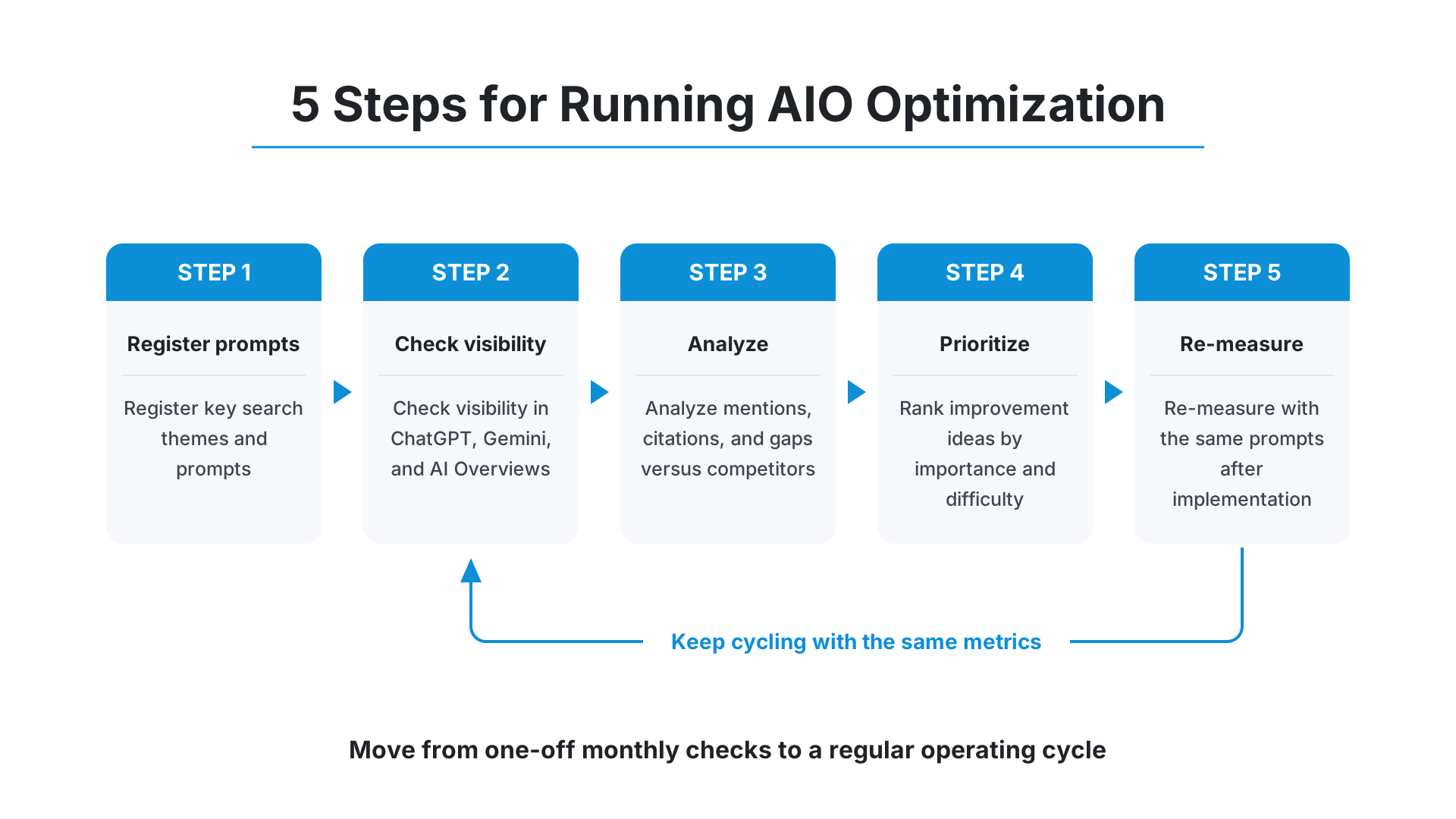
Running AIO optimization in the following five steps keeps your team's decisions consistent.
Register your key search themes and prompts
Check visibility in ChatGPT, Gemini, and AI Overviews
Analyze mentions, citations, and gaps versus competitors
Rank improvement ideas by importance and difficulty
Re-measure with the same prompts after implementation
Dr.AISEO lets you go from prompt management to visibility diagnosis and to-do creation in a single environment. Rather than deciding actions based on individual experience alone, regularly checking the same metrics is the prerequisite for continuous improvement.
Cover Content, Technical, and Off-Site Work Without Gaps
In AIO optimization, simply adding more content is not always enough. Pages need to be crawled and indexed, key information needs to be provided as text, and the site needs to earn outside trust.
Google says there are no special technical requirements for appearing in AI Overviews or AI Mode, while it continues to recommend traditional SEO such as crawlability, internal linking, page experience, text content, and structured data (developers.google.com). Dr.AISEO's to-dos include not only content generation but also technical and off-site actions, making it easier to avoid gaps in your work.
Turn It into Monthly Reports That Lead to Ongoing Proposals
In monthly reports, show not just the month's visibility rate but also month-over-month change, changes by prompt, cited pages, and completed to-dos. Because AI answers fluctuate, do not declare results based on a single point in time. It is important to record trends under the same conditions.
Including the following items in your reports makes it easier to lead into ongoing proposals.
Mentions and citations by AI model
Comparison with competing brands
Prompts that rose or fell since last month
Completed and outstanding actions
Content, technical, and off-site priorities for next month
Pricing and Operating Terms to Check Before You Adopt
Compare AIO tool pricing not only on the monthly fee but also on setup fees, number of brands, number of members, and data retention period. For SEO consultants and adopting companies, what matters more than the tool's unit price is its effect on report preparation time per account and on proposal quality.
How to Think About Setup Fees, Monthly Fees, and Additional Brand Fees
Dr.AISEO's Agency plan has an initial setup fee of ¥200,000 and a monthly fee of ¥30,000. It covers one initial brand, and additional brands are available from ¥30,000 per brand per month. The Agency plan includes 36,000 credits, content generation, to-dos for all features, and unlimited workspaces.
When comparing prices, use the following calculation to check the effective cost per account.
Effective tool cost per brand = Monthly fee ÷ Number of brands managed
Even if the unit cost falls as you add brands, the effort of registering prompts and reporting to clients may grow. You need to weigh not only price but also how many accounts you can realistically run and how much time your team spends.
How the Number of Editor Members and the Data Retention Period Affect Your Work
If multiple people will use the tool, check the difference between edit and view permissions. On Dr.AISEO's Agency plan, up to five editor members are free, and each additional member from the sixth costs ¥3,000 per month. Viewer members are unlimited, and there is no limit on the data tracking period.
When staff analyze the data and managers or clients view it, having few restrictions on viewer members helps with reporting. Whether you can compare historical data over the long term is another condition to check when tracking fluctuations in AI search.
What to Look For: In-House Use vs. Agency Operations
For in-house use, prioritize analysis accuracy, integrations, and ease of use for your internal staff. When an agency or SEO consultant provides the service to clients, white-label support, PDF export, multiple brands, and member permissions become important.
Dr.AISEO's Agency plan includes white-label support, PDF reports, customer support via AI chat, feature request rights, and priority access to beta features. If you offer AIO optimization as a client service, compare total costs with these included.
If you want to handle everything from analysis to reporting in one environment. Dr.AISEO lets you manage prompts, run visibility diagnoses, create to-dos, and export white-label reports in a single workspace. It is designed to let you take on more accounts while cutting the work of rebuilding analysis screens for each client.
FAQ: Common Sticking Points When Choosing an AIO Tool
Can You Judge Results with an AIO Tool Alone?
No, you cannot judge results with an AIO tool alone. Mention and citation rates are indicators of visibility in AI search and do not necessarily reflect inquiries or revenue directly.
To judge results, check Google Search Console, web analytics, inquiry counts, resource request counts, and more in addition to your AIO tool's data. Google also suggests analyzing traffic and conversions from AI search by combining Search Console, Google Analytics, and similar tools (developers.google.com).
How Much Should You Rely on Google Search Console?
You should keep using Google Search Console as your baseline measurement even after adopting an AIO tool. Check impressions, clicks, CTR, and average position to understand how your AI search work has affected regular search and site traffic.
If the generative AI performance report is available, you can see AI Overviews and AI Mode impressions by page, country, date, and device. However, the feature is still rolling out and may not be available for every property. Even if it is not available, use the standard performance report together with your AIO tool's data.
What Criteria Should You Use When Choosing Your First Tool?
When choosing your first AIO tool, use three criteria: it can measure across multiple models, its improvement recommendations are specific, and you can report to clients with it. In particular, if you look at analysis results and still do not know what to do next, prioritize to-do features.
Dr.AISEO, which we provide, supports prompt management, visibility diagnosis, action recommendations, and report export for ChatGPT, Gemini, and AI Overviews. If you are still feeling your way through AIO optimization, we recommend first mapping out your current support workflow, deciding which stages you want a tool to streamline, and then comparing options.
Summary: Choose an AIO Tool That Drives Action, Not One That Only Measures
When SEO consultants and businesses choose an AIO tool, it is important to judge it not only on the accuracy of its visibility diagnosis but also on how smoothly it connects analysis results to actions and reporting.
Can it work across multiple models? If you cannot check across your target AI search environments, such as ChatGPT, Gemini, and AI Overviews, you cannot accurately understand your brand's overall visibility.
Does analysis lead to improvement recommendations? Whether the tool is designed to turn visibility diagnosis results into a prioritized to-do list for your next actions, rather than just displaying them, determines your operating effort.
Can you use it for client and internal reporting? Comparing tools on how the deliverables look, including white-label and PDF reports, helps you avoid gaps after adoption.
AIO optimization does not replace traditional SEO. It extends your existing SEO assets so they are also used in AI search. If you are unsure which tool to choose, we recommend first identifying where the bottleneck lies in your own (or your client's) support workflow, then comparing the tools that can remove that bottleneck.