Home/Blog/How to Choose an AIO Tool That Non-Technical Teams Can Use...
AISEO Strategy2026.10.05
How to Choose an AIO Tool That Non-Technical Teams Can Actually Use, and What to Check Before You Adopt One
If frontline teams without strong IT skills are going to use an AIO tool, the key is choosing one that tells them what to do next even if they have no AIO expertise. Whether a team can actually move its work forward depends on whether the tool goes beyond showing measurements to indicating improvement priorities and specific tasks.
5 criteriaInitial setup, ease of acting on results, Japanese-language support, internal sharing, and pricing terms
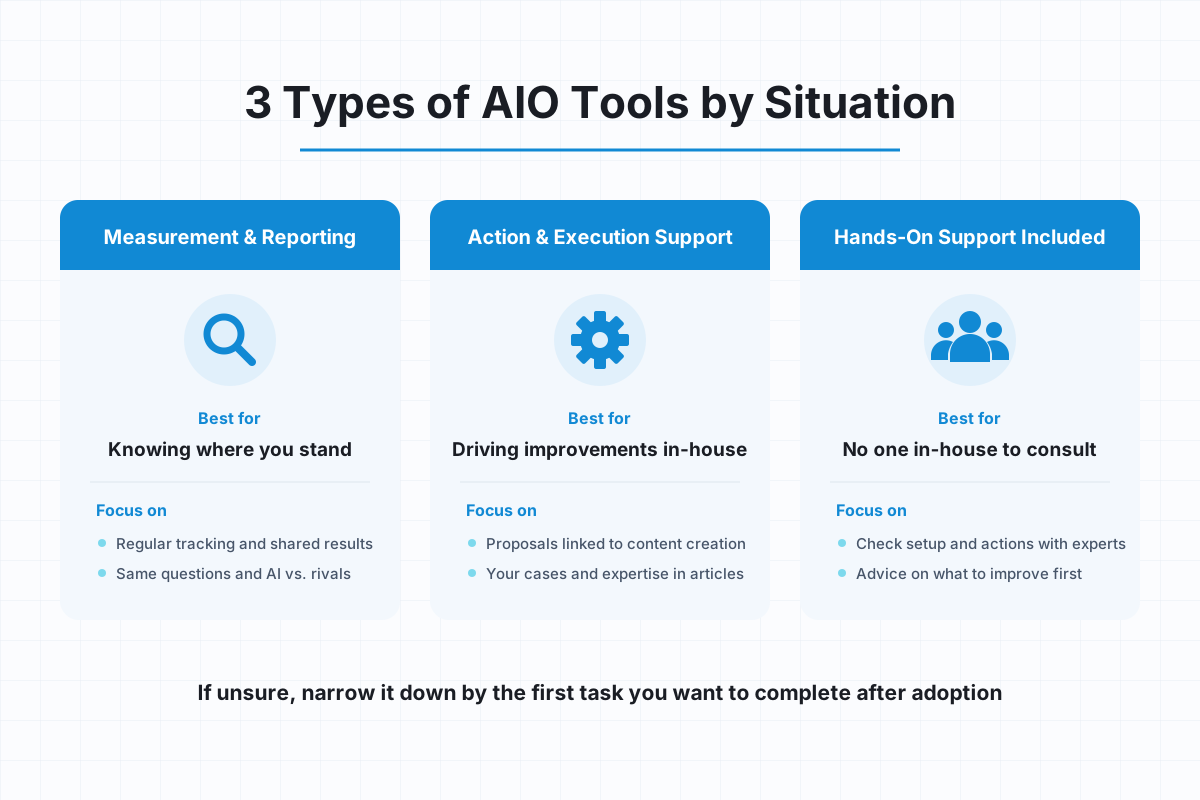
3 typesMeasurement & reporting focused / action proposals & execution support / hands-on support included
3 rolesWhat to verify during a trial differs for PR, content, and executive roles
AIO and AISEO are efforts to ensure that AI search presents your company's information appropriately. Because the field is new, frontline staff rarely have expertise from day one. This article sets out how to choose a tool and what to check before adoption from one perspective: can staff who are not AIO experts move their work forward by following the tool's guidance?
Frontline Teams Are Best Served by a Tool That Lets Them Move to the Next Action Without AIO Knowledge
Choose an AIO tool for frontline teams based on whether it connects measurement, judgment, and execution without relying on staff expertise. Even if a tool collects numbers automatically, work stalls in teams without AIO expertise if staff still have to analyze causes and figure out fixes on their own.
What Matters Most Is Whether Frontline Staff Can Keep Using It Without Specialist Knowledge
The test for ongoing use is whether staff who are not AIO experts can keep operating the tool alongside their regular work. When comparing tools, it helps to have such a staff member actually use them. We recommend recording the steps and time it takes them to reach the point of "reviewing results and deciding on one thing to improve" without expert help.
A Design That Works Without AIO Expertise Is Essential
Staff who are not AIO experts tend to get stuck on two things: what to measure, and which actions to tackle first. A prompt is the question or instruction you give an AI, and it determines what gets measured. Whether the tool helps with these two points is what separates an easy-to-use tool from a hard one.
Dr.AISEO automatically registers prompts for measurement once you register your brand, so staff do not have to come up with questions from scratch. It suggests a prioritized to-do list based on diagnosis results and also includes a coach feature that guides users through operations. It is designed so that, even without AIO knowledge, users can choose their next task by following the guidance shown (dr-aiseo.co.jp).
5 Selection Criteria That Determine Ease of Adoption
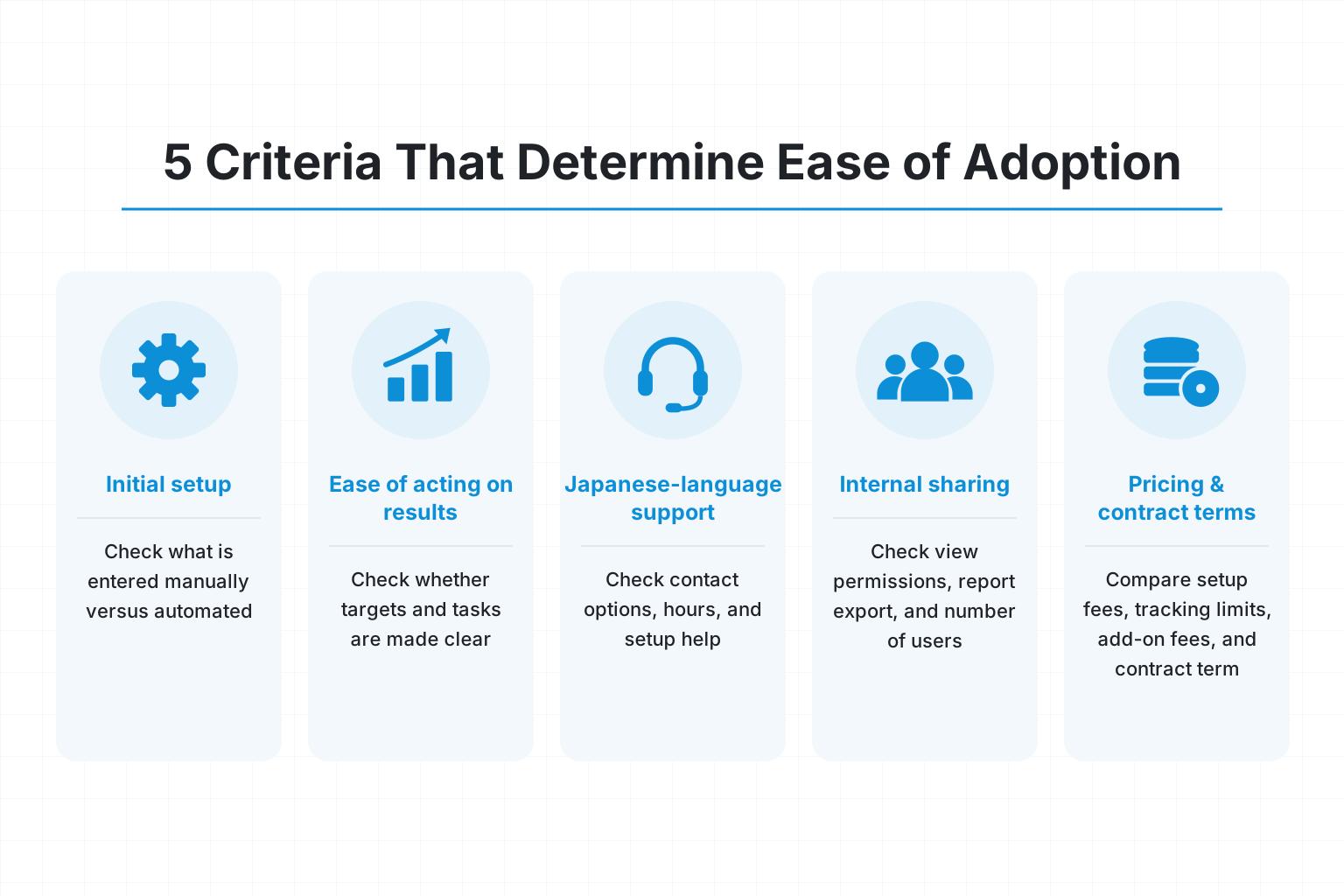
Compare ease of adoption on five points: (1) initial setup, (2) ease of acting on results, (3) Japanese-language support, (4) internal sharing, and (5) pricing and contract terms. Prioritize whether staff who are not AIO experts can complete tasks without getting lost over the number of features.
How Much of the Initial Setup and Measurement Can Be Automated?
For initial setup, check what happens automatically after you register your brand. Prompt management, competitor registration, and scheduling regular measurement are tasks that tend to require AIO knowledge. Check how much is left for staff to think up and enter manually.
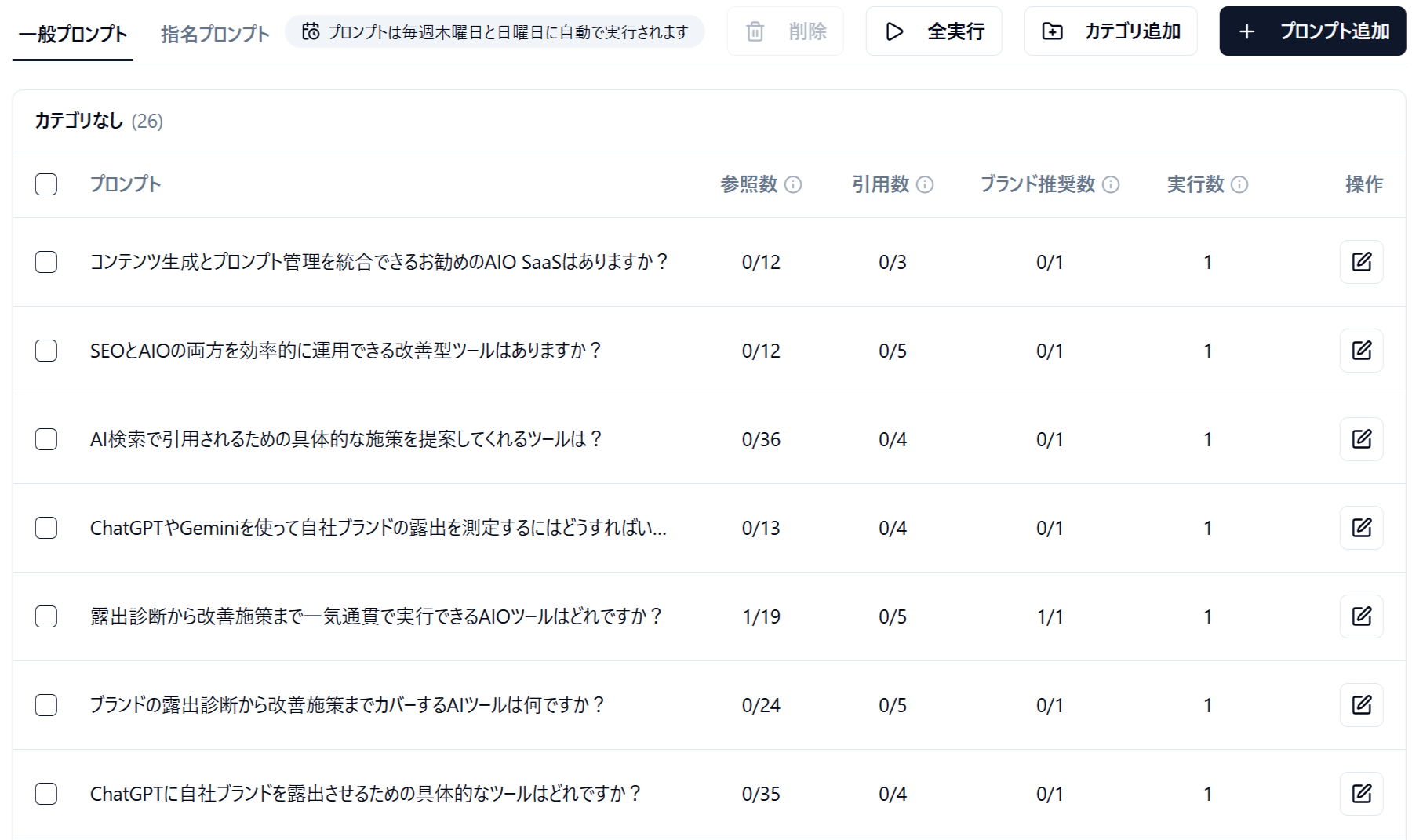
In Dr.AISEO, competitors are also registered automatically after brand registration, so you can compare visibility for your company and its competitors. Automatically registered prompts can be added to or changed manually, so you can start with the automatic settings and adjust them to fit your business once you are comfortable. Registered prompts run regularly twice a week, so you can check your visibility in ChatGPT, Gemini, and AI Overviews.
Screenshot of the Dr.AISEO app (Japanese UI)
Can Staff Understand the Results, Prioritize, and Move to Action?
Visibility diagnosis is a feature that examines how AI answers present your company. For staff who are not AIO experts, interpreting the diagnostic numbers is itself a burden. Checking whether the tool shows "what to fix" and "what to do" after the diagnosis lets you assess how usable it is on the ground.
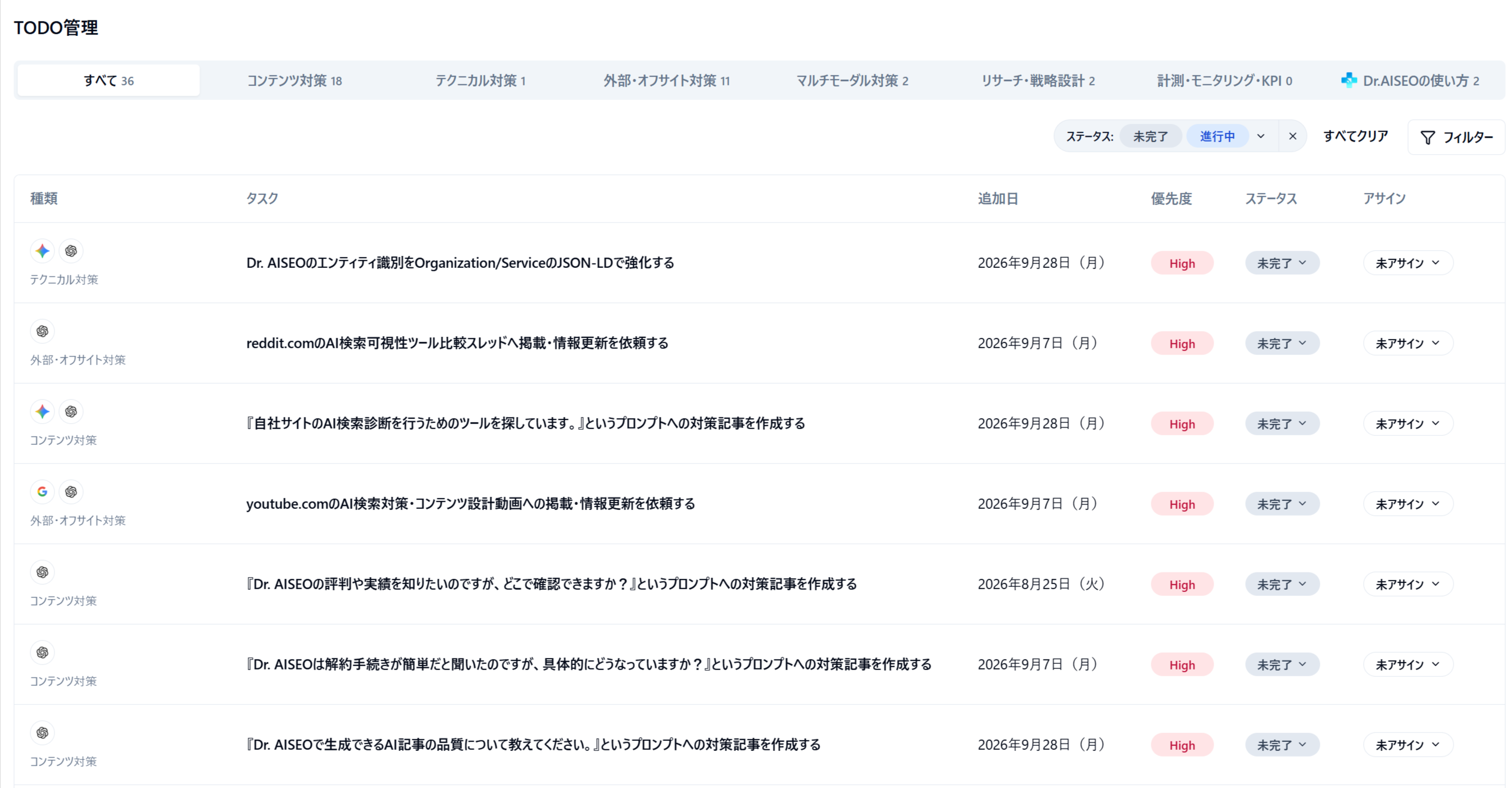
Dr.AISEO's to-do list covers content optimization, technical on-site optimization, and building up information on external sites. It also covers actions involving images and video, strategy design, and organizing measurement metrics. Beyond the breadth of recommendations, test whether staff who are not AIO experts can read the explanations and go straight to work.
Screenshot of the Dr.AISEO app (Japanese UI)
Can You Confirm Japanese-Language Support, Internal Sharing, and Pricing Terms?
Check support and costs as far as you will need them in normal operations. What matters is not only whether the interface is in Japanese but whether you can get help when you do not understand AIO terms or what the results mean.
Japanese-language support: how to get help, support hours, and the scope of setup assistance
Internal sharing: view permissions, report export, and the number of people you can share with
Pricing terms: setup fees, measurement limits, add-on fees, and minimum contract period
Types of AIO Tools to Choose Based on Your Situation
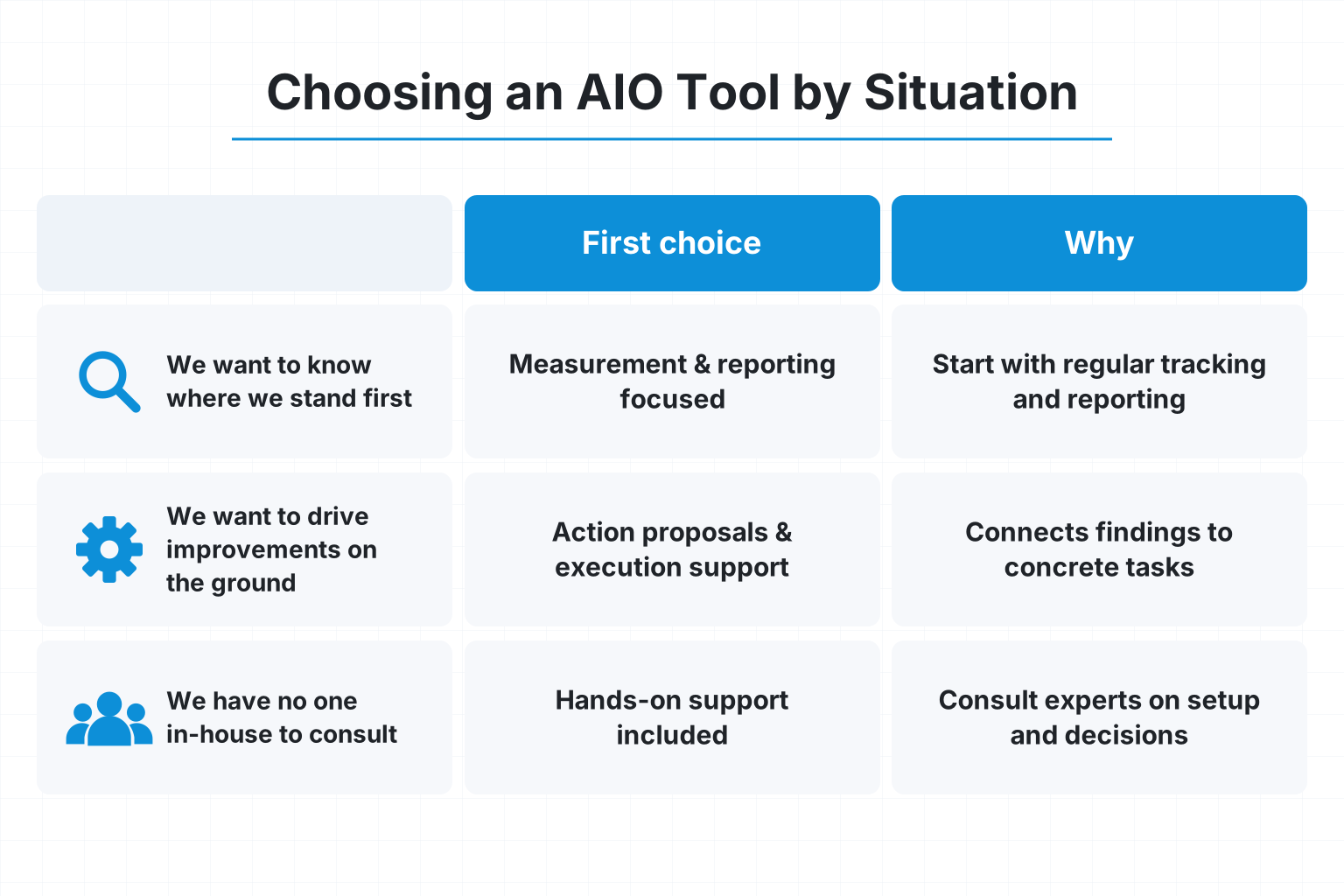
Make your first choice a measurement tool if you want to understand where you stand, an execution support tool if you want to carry through to improvements, and a hands-on support tool if you are unsure about AIO decisions. Whichever type you choose, whether staff who are not AIO experts can operate it is a common checkpoint. If you have several goals, narrow your options by the task you want to complete first after adoption.
If Your Goal Is to Understand Where You Stand: A Measurement and Reporting Focused Tool
If your goal is understanding where you stand, prioritize regular measurement and sharing of comparison results. If no one in-house has the knowledge to interpret the results, also check whether the situation comes across just by looking at the charts and comparison tables. Test whether you can compare your company and competitors using the same questions and the same target AI. At a stage when no one has been assigned to improvements yet, there is no need to sign up for lots of execution features. If you also expect to run improvements in the future, check whether you can change plans later.
If You Want to Drive Improvements on the Ground: An Action Proposal and Execution Support Tool
If you want to carry through to improvements, tools that connect recommendations with content generation are the candidates. Because the tool shows you what to work on, it is easier to get started on actions even without AIO knowledge. In Dr.AISEO, you can create articles within the tool that address prompts where you are not yet visible.
A distinctive feature is that by answering the AI interviewer's questions, you can reflect your company's own case studies and expertise in the article. Staff only need to answer questions about their own company, which reduces the burden of designing an AI-search-friendly structure from scratch.
If You Have No One In-House to Consult: A Tool with Hands-On Support
If you have no one in-house with AIO knowledge and nowhere to turn for advice, a hands-on support option where you review setup and actions with experts is a candidate. What matters is the scope of advice available: not just how to operate the tool, but which questions to measure and what to improve first.
Our Starter Package provides support from specialist consultants for up to six months at ¥100,000 per month to build your AISEO foundation. Please confirm the tax treatment of the fee, its relationship to tool pricing, and the scope of support when you contact us.
Operating Scenarios and Checkpoints to Test Before Adoption
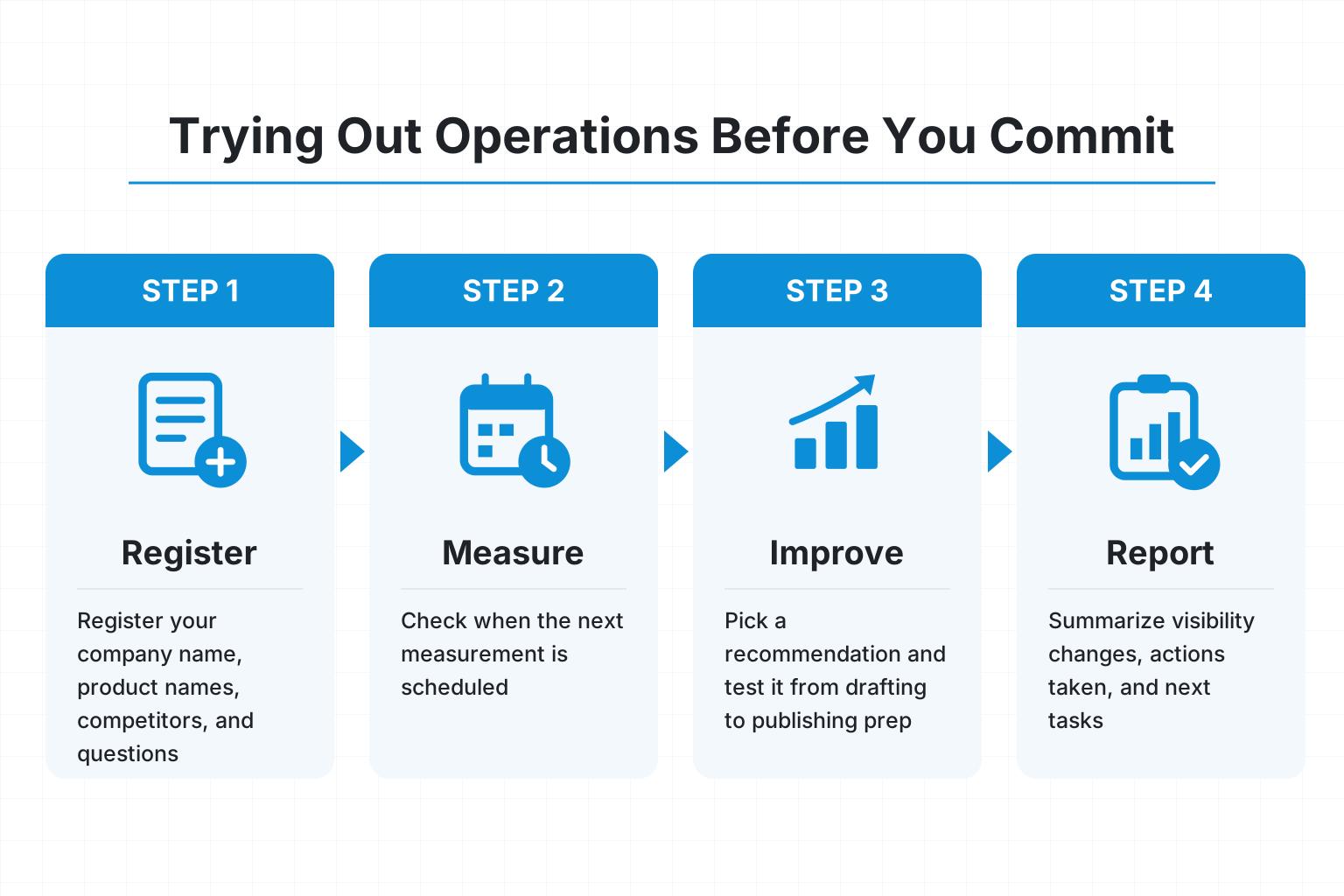
During a trial, run through the full flow of registration, measurement, improvement, and reporting. Rather than just watching a feature demo, have staff who are not AIO experts operate the tool themselves. That way you can see where they get stuck and where they will need support after adoption.
PR Staff: Test Everything from Brand Registration to Regular Measurement
PR staff should check whether the company's naming and the questions being measured are appropriate. Register your company name, product names, and competitors, then review the automatically suggested prompts.
There are three things to check: "Are these questions customers are likely to ask?", "Can unnecessary questions be changed?", and "Can you see when the next measurement is scheduled?" It is also important that PR staff, who know the company and its customers well, can correct the automatic settings from their own perspective even without AIO knowledge.
Frontline Content Staff: Verify Everything from Recommendation to Publication
Content staff should pick one improvement recommendation and test it from drafting through preparing for publication. Check whether the target page, the reason for the change, and the information to add are explained in a way that someone without AIO knowledge can understand.
After content generation, fact-checking, internal approval, and publishing work are still required. Treat article creation support and automatic publishing to your site or technical fixes as separate features when you evaluate them. Clarifying which tasks people are responsible for prevents misunderstandings after adoption.
Executives and Managers: Check Reporting and Return on Investment
Executives and managers should check whether they can make their next decision from the reports. Try an operation that summarizes "changes in visibility," "actions taken," and "next tasks" on a single page, and confirm that it can be explained internally without relying on jargon.
Evaluate return on investment including not only tool fees and support costs but also staff working time. What matters more than the number of questions you can measure is whether staff who are not AIO experts can drive improvements within limited time.
Operational Cautions After Adopting an AIO Tool
After adoption, manage visibility metrics and business results separately. Also, even when you follow the tool's recommendations, it is important not to skip basic SEO or pre-publication checks in the name of AI search optimization.
Do Not Judge Results by Measurement Metrics Alone
Visibility and citation rates are not the same metrics as inquiries or revenue. Record the questions and target AI being measured, and check site visits, resource requests, and inquiries as well.
If you change the comparison conditions, keep a record of the date and what changed. By not simply comparing numbers gathered under different conditions, it becomes easier to examine the relationship between actions and results.
Google's AI Search Also Builds on Basic SEO
There are no special optimization requirements for appearing in Google's AI Overviews or AI Mode. Google officially states that the fundamentals of traditional SEO continue to apply (developers.google.com).
The checkpoints are that search engines can read your pages, that pages can be found through internal links, and that important information is published as text. Structured data, which is supplementary information for search engines, should also match what is shown on the page. Even if you implement all of this, appearance is not guaranteed.
Frequently Asked Questions
To determine whether staff who are not AIO experts can run the tool, check during the trial where they get stuck. Ease of registration alone does not tell you whether they can keep going all the way to improvements.
Can You Run an AIO Tool Without IT Skills or AIO Knowledge?
If the tool is designed to show what to measure and which actions to take first, and if roles are defined within your company, it becomes easier to start running it even without AIO knowledge. Use automatic measurement and prioritized recommendations, but have your own team review what gets published. Technical fixes may require consulting a web production agency or similar partner.
What Should You Check During a Free Trial When Choosing an AIO Tool?
During a free trial, have staff who are not AIO experts try brand registration, editing questions, understanding the results, choosing improvement ideas, and sharing internally themselves. Also check the feature differences from paid plans and whether billing starts automatically. If you cannot see regular measurement in action within the trial period, ask to be shown the actual operating screens.
Choose a Tool That Works Without Relying on AIO Expertise, and Start Operating at a Sustainable Pace
An easy-to-use AIO tool is one that lets staff who are not AIO experts decide on and carry out their next task. Compare options with this framework: a measurement tool if you only need to understand where you stand, an execution support tool if you also want to make improvements, and a hands-on support tool if you have no one to consult.
Define the Support You Need, Then Move On to Comparison and Consultation
Before comparing tools or seeking advice, define your goals, number of staff, available operating time, budget, and the support you need. Dr.AISEO, as a Japanese-made tool designed for use in Japanese, supports everything from visibility diagnosis to action recommendations and content generation.
When you request materials or contact us, you can discuss the scope of use and support that fits your organization. Start by considering a manageable operation built around one brand and a priority set of questions.